Imported repository documentation. Claims and project status reflect the source. Read the source on GitHub ↗
TripWala ✈
TripWala is an offline, standalone desktop Flight Management System for a class 12 project. It uses Python, PySide6 for the native interface, and a local MySQL database. There is no browser, web server, external API or internet connection in the app.
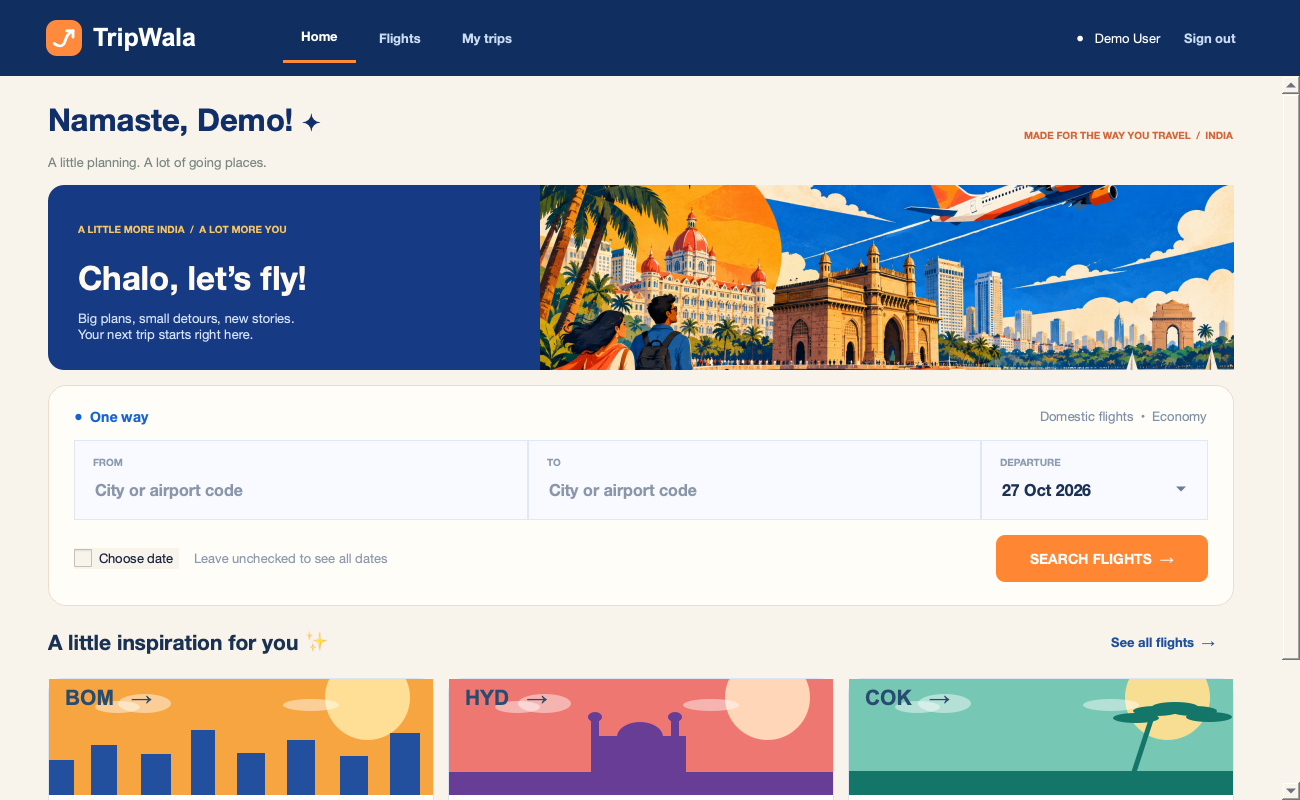
Preview
Screenshots show illustrative sample data.
What it does
- Register and sign in as a traveller; passwords are salted and hashed.
- Search flights by origin, destination and optional departure date (including common city aliases such as Bangalore/Bengaluru), enter traveller and contact details, review the fare, book seats, see bookings and cancel future bookings.
- See all currently airborne simulated flights on an offline world map, select one by clicking its marker or searching, and zoom to its route. Positions follow an illustrative great-circle path and use simulated schedules and delays, not live GPS or real airline flight paths. Airport coordinates cover over 4,000 airports; flights without known coordinates show timing and status without a map marker.
- Sign in as an administrator to add flights, set delays, cancel flights and view all bookings.
- A local timer updates flight statuses every 2 seconds while the app is open. Flight times advance with the real clock; reopening the app catches statuses up.
- The simulator maintains seven calendar days of fictional domestic and international flights, with approximate distance-based flight durations for the expanded network, and checks every 30 seconds for flights within two hours of departure. Each eligible flight gets one 12% chance of a 15–60 minute delay. Delays shift simulated departure and arrival. Admin-set delays (including zero) override automatic delays; cancelled flights remain cancelled.
- Airline names and logos make the interface familiar, but all schedules, flight numbers and prices are fictional and are not airline-provided data. All flight times use the computer’s local time, including international flights; the app does not calculate airport time zones. Existing flights keep their original schedules; older generic airline labels are updated while booking and flight IDs remain unchanged. The simulation runs only while the app is open; missed delay rolls are not replayed after reopening.
Requirements
- Python 3.10 or newer, with a version supported by PySide6 and MySQL Connector/Python.
- A locally installed and running MySQL server (tested locally with MySQL 9.6). Remember its username and password; the account needs permission to create a database and tables on first run.
- PySide6 and mysql-connector-python, listed in
requirements.txt. Installing dependencies may require internet; running the app does not.
Run
Open a terminal in this folder:
python -m venv .venvActivate it with source .venv/bin/activate on macOS/Linux or .venv\Scripts\activate on Windows, then:
python -m pip install -r requirements.txt
python main.py
Enter your local MySQL host (localhost), port (3306), username and password in the connection window. The connection dialog does not save credentials. For automatic local connection, create a mysql.local.json file in the project folder with host, port, user and password fields. This optional file is ignored by Git and stores the password as plaintext; restrict access to it and do not share it. The app creates flight_management and its tables on first connection. If your MySQL account cannot create databases, ask the MySQL administrator to grant the required permissions.
First-run administrator login:
- Email:
admin@flightdesk.local - Password:
Admin@123
These are demonstration credentials. The application currently has no password-change screen; use this account only for a local classroom demo. Register a separate account for the traveller interface. The demo account is created only when the users table is empty.
Project structure
main.py— application entry point.flightdesk/ui.py— PySide6 login, traveller, administrator and tracker screens.flightdesk/db.py— MySQL schema, queries, bookings and flight simulation.flightdesk/geo.py— offline airport lookup and great-circle calculations.flightdesk/assets/— bundled map, airport coordinates, illustrations and airline logos.
Database design
users: login details and role.flights: route, schedule, seat capacity, price, delay and status.booking_passengersandbooking_contacts: traveller names and contact details linked to a booking.bookings: passenger reservations, withuser_idreferencingusers(id)andflight_idreferencingflights(id)through foreign keys.simulator_days,simulator_network_days, andsimulator_domestic_v2_days: record generated schedule dates to prevent duplicates.
Relationships: one user can have many bookings; one flight can have many bookings; each booking can have many passenger names and one contact record. The passenger and contact tables reference bookings(id) with foreign keys.
Bookings are inserted in a transaction that locks the flight record and checks available seats. Cancelling a booking keeps its history and releases its seats. Cancelling a flight retains reservations and shows the flight’s cancelled status alongside them. No real payments, ticket issuance or live flight data are involved.
Notes for a school project report
Aim: build an offline flight management application in Python with a relational MySQL database.
Modules: authentication, flight search, booking and cancellation, administrator operations, and a clock-driven flight tracker. PySide6 provides the desktop interface; MySQL Connector/Python connects it to MySQL.
Booking flow: select a flight → enter traveller and contact details → review the fare → confirm. The database locks the flight record, checks the remaining capacity, and saves the booking and associated details in one transaction. No payment is processed.
Simulation: the application periodically generates fictional routes, assigns delays, and updates flight statuses using the computer’s clock. The map interpolates each airborne aircraft along an approximate great-circle route. It does not access live airline feeds.
Testing ideas: register and log in; search Bangalore to Chennai; book multiple travellers; verify that capacity decreases; cancel and confirm capacity returns; set an admin delay and check the tracker; close and reopen the app. Use your own screenshots and observed results in the report.
Troubleshooting
- Connection refused: start the local MySQL server and check host and port.
- Access denied: check the MySQL username, password and database creation privileges.
- No flights: clear the search or add flights through the admin account; seed flights eventually move into the past.
- Dependencies fail to install: use a Python version supported by current PySide6 wheels, such as Python 3.12 or 3.13.
Data and artwork credits
The offline world map uses Natural Earth 1:110m land data, which is public domain.
Airport coordinates are bundled from the OurAirports open-data project; the app does not contact it at runtime.
Airline logos are bundled from Wikimedia Commons for this educational demonstration: IndiGo, Air India, Air India Express, Emirates, Singapore Airlines, Qatar Airways, British Airways, American Airlines, ANA, SpiceJet, and Vistara. Logos remain the property of their respective owners; the project is not affiliated with these airlines.


.svg)


